NDA Application Form 2026: Step-by-Step Guide to Apply Online
Learn how to fill the NDA Application Form 2026 with this step-by-step guide covering eligibility, required documents, fee payment, photo upload rules, and common mistakes to avoid for a successful UPSC application.
NDA Application Form 2026: Step-by-Step Guide to Apply Online
Every year, thousands of NDA aspirants lose their attempt not in the exam hall but at the application stage. A wrong photo background, an incomplete Part II, or a name mismatch with the board certificate is enough for UPSC to reject the form outright. The NDA Application Form 2026 process on upsconline.nic.in follows a strict two-part structure, and skipping any single step results in an invalid submission with no recourse after the final click. This guide walks you through every step in sequence, covers upload specifications to the byte, and flags the six mistakes that cause the most rejections, particularly when it comes to how to fill NDA form 2026 online.
Before You Start: Eligibility and Documents Checklist
Confirming your eligibility before touching the UPSC online application portal saves you from discovering a disqualification mid-form. NDA eligibility 2026 requires candidates to be unmarried male or female Indian citizens, though certain categories of Nepali and Bhutanese subjects are also permitted under specific conditions. The same applies to UPSC NDA apply online 2026.
Age and academic eligibility at a glance: Keep these details ready for NDA form documents required.
-
NDA age limit 2026: Born between July 2, 2007 and July 1, 2010 (both dates inclusive) for NDA NA II 2026, placing the permissible window at 16.5 to 19.5 years at the time of course commencement.
-
Class 12 eligibility NDA: Candidates must have passed or be appearing in Class 12 (10+2 pattern) from a recognised board. The Army wing accepts any stream; Navy and Air Force wings require Physics and Mathematics at Class 12 level.
-
Nationality: Indian citizenship is mandatory for most candidates.
Once eligibility is confirmed, gather every document before opening the portal. Arriving unprepared is the single biggest cause of incomplete submissions, since the portal session can time out and fields cannot be saved mid-entry without completing a full step. Keep this in mind for NDA eligibility 2026 and upsconline.nic.in NDA registration alike.
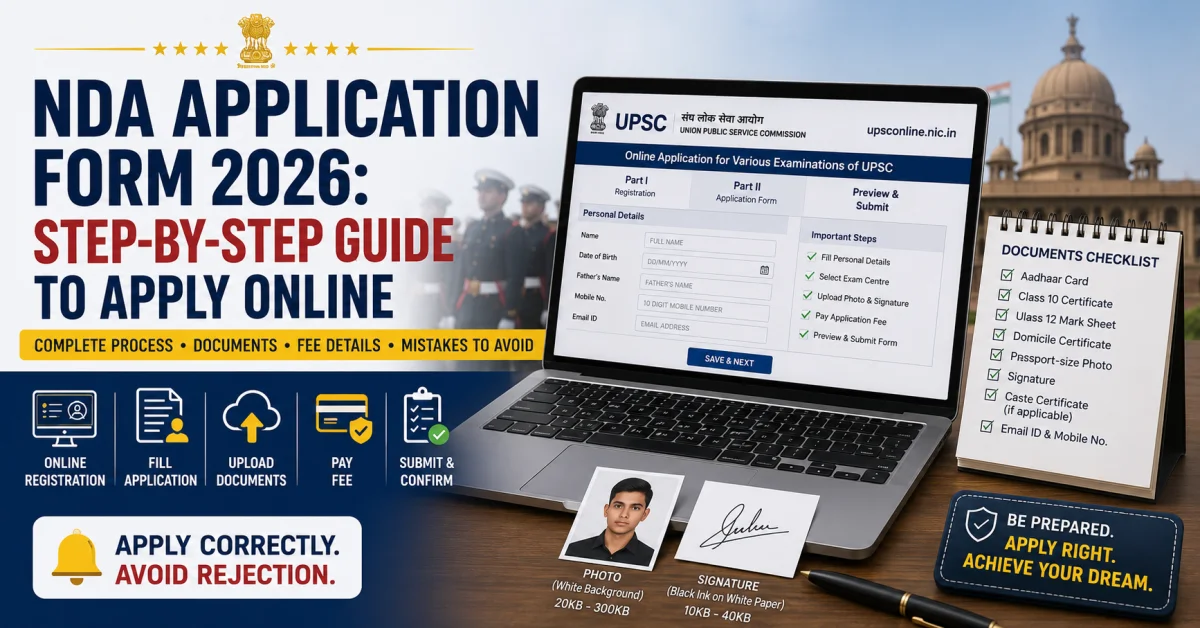
Documents to keep ready (NDA form documents required):
-
Aadhaar card (for identity verification)
-
Class 10 certificate (date of birth proof)
-
Class 12 mark sheet or passing certificate
-
Domicile certificate, if required by your state
-
Scanned passport-size photograph (white background, JPEG format)
-
Scanned signature on white paper in black ink
-
Active email address and mobile number (used for registration ID and OTP)
-
Caste certificate (SC/ST candidates seeking fee exemption)
-
Relevant military service document (for JCO NCO sons fee exemption)
-
Cross-check every document against your board certificate before proceeding. According to Testbook, name mismatches between the form and the board certificate are among the top rejection triggers UPSC has flagged repeatedly across NDA cycles. This applies equally to upsconline.nic.in NDA registration.
NDA 2026 Registration Fee and Payment Methods
The NDA 2026 registration fee structure is straightforward, but it contains a category-specific exemption that many candidates overlook. Paying the correct amount through an accepted channel is a hard requirement; the application is not processed until fee status is confirmed by UPSC.
Fee structure for UPSC NDA apply online 2026:
-
Fee structure for UPSC NDA apply online 2026:
-
General and OBC candidates: ₹100
-
Female candidates: Fully exempt, no payment required (regardless of category)
-
SC/ST candidates: Fully exempt, no payment required
-
Sons of JCOs, NCOs, and ORs (Other Ranks): Fully exempt under the JCO NCO sons fee exemption provision
-
Exempted candidates, including female candidates, must still complete the fee section on the portal by selecting the applicable exemption option. Skipping this step entirely leaves the application in an incomplete state.
Accepted payment methods:
-
SBI Net Banking
-
Credit or debit card (Visa, Mastercard, RuPay)
-
SBI Bank challan fee payment (offline cash deposit at any SBI branch, valid before the challan deadline)
The SBI Bank challan option requires printing the challan generated on the portal and depositing cash at an SBI branch within the stipulated time. Payment is then reflected in the UPSC system after processing, which can take up to 24 hours. Candidates using this method must account for that delay before the NDA 2026 last date.
For UPSC NDA NA II 2026, UPSC extended the application deadline to June 11, 2026, as confirmed by official notices. Deadlines can shift between cycles, so always verify the active closing date directly on upsconline.nic.in before beginning the form. Third-party sites sometimes display outdated dates.
Step-by-Step: How to Fill the NDA Application Form 2026 on UPSC Portal
Learning how to fill NDA form 2026 online starts with understanding that the process is split into two mandatory stages. Neither Part I nor Part II alone constitutes a complete application. Both must be submitted successfully, in order.
-
Visit upsconline.nic.in and open the official UPSC online application portal on a desktop or laptop browser. Mobile submissions are error-prone and not recommended.
-
Click "Online Application for Various Examinations of UPSC" on the homepage. Locate the NDA NA II 2026 (or the active cycle) link and click "Click Here" to begin.
-
Part I Registration involves entering personal details, including full name (exactly as on the board certificate), date of birth, father's name, Aadhaar number, email ID, and mobile number. Select gender, nationality, and domicile state carefully.
-
Note the Registration ID generated after completing Part I. UPSC displays this on screen and sends it to the registered email. This ID is mandatory for logging in to Part II registration; losing it means you cannot continue.
-
Part I and Part II registration are separate sessions. Log back in using the Registration ID and password to begin Part II. This stage covers NDA exam centre selection (up to four preferences in order), scanned passport-size photo upload, and signature upload.
-
Fee payment is completed in Part II via the method described in the previous section.
-
NDA form preview step: Before the final submit, UPSC displays a full preview of all filled fields. Review every entry, including name spelling, DOB format, category, and uploaded files. This is the only correction opportunity available.
-
Final submission and print: After confirming the preview, click Submit. Download and print the UPSC form submission confirmation page. UPSC does not send a physical acknowledgement, so this printout is your only proof of a successful application.
Photo and Signature Upload Specifications
The scanned passport-size photo upload and signature upload steps cause the most technical rejections. UPSC's system performs automated checks on file size and format, and a file outside the specified range is rejected before a human reviewer ever sees it.
Use the reference below before scanning either document:
-
Photograph: JPEG format only, file size between 20 KB and 300 KB, white background, recent (taken within three months), front-facing with full face visible, no sunglasses or cap.
-
Signature: JPEG format only, file size between 10 KB and 40 KB, signed in black ink on plain white paper, normal cursive style (not capital letters). Block capitals are not legally recognised as a signature under UPSC standards, which is why the black ink signature specifications explicitly require cursive.
Uploading a photo with a coloured or studio-gradient background is an instant rejection trigger. Unlike document errors that occasionally surface at a later stage, a failed upload spec cannot be corrected post-submission. Scan both files against a good light source, check the KB size in file properties before uploading, and resize using a standard image compressor if needed. According to PW Only IAS, photo-related errors account for a disproportionately high share of NDA form rejections each cycle.
6 Common Mistakes That Get NDA 2026 Forms Rejected
These six errors appear repeatedly across NDA application cycles and consistently result in outright rejection or disqualification during document verification.
-
Wrong date of birth format: The portal requires DD/MM/YYYY. Entering the month and day in the wrong order, particularly for candidates used to American date formats, causes a DOB mismatch that UPSC cannot overlook during verification.
-
Name mismatch with board certificate: The name on the form must be letter-for-letter identical to the Class 10 certificate. Initials expanded, surnames abbreviated, or middle names dropped are all flagged during document verification.
-
Photo background not white: Any off-white, cream, or studio-blur background fails the UPSC photo check. Use a plain white wall or a white sheet as the background when clicking or scanning the photograph.
-
Selecting the wrong NDA exam centre: NDA exam centre selection cannot be changed after final submission. Choose centres closest to your location and within your travel capacity, because UPSC assigns from your preference list and does not accommodate centre-change requests.
-
Not saving Part I before proceeding to Part II: If the browser is closed or the session expires before Part I data is saved and the Registration ID is noted, the entire Part I must be refilled. Always note the Registration ID before closing the window.
-
Paying the fee without completing Part II: Some candidates pay via SBI Bank challan or net banking but exit the portal before completing the Part II form fields. Fee deducted but Part II incomplete equals a rejected application. UPSC does not refund fees in such cases.
If you are preparing for the NDA Application Form 2026 and want to strengthen your overall readiness, exploring the NDA 2026 Preparation Guide at Defence Study can help you build a solid strategy, understand exam patterns, and make informed decisions about your defence career path ahead of the application deadline.
NDA 2026 Form Correction Window: What Can and Cannot Be Changed
UPSC's correction policy is strict, and understanding it before submission is essential. The NDA application rejection reasons most likely to be irreversible are those discovered only after the final submission click.
What can be corrected: Everything, but only during the NDA form preview step. At that stage, candidates can go back and edit any field, re-upload photos or signatures, change the exam centre preference, or correct the name and DOB entry. This window closes permanently the moment the Submit button is clicked.
What cannot be changed after submission: No post-submission edit facility has been announced for UPSC NDA NA II 2026 or previous cycles. UPSC does not provide a correction window after final submission, unlike some other competitive exams that offer a dedicated edit period. Fields locked after submission include:
-
Name and date of birth
-
Category (General, OBC, SC, ST)
-
Exam centre preferences
-
Uploaded photo and signature
-
Email ID and mobile number
Treat the preview step as your final audit. Read every field aloud against your documents before clicking Submit. Print the UPSC form submission confirmation page immediately after submission, since this confirmation is the only record that your application reached UPSC successfully.
FAQs
What is the step-by-step process to fill the NDA Application Form 2026 on upsconline.nic.in?
The process uses Part I and Part II registration in sequence. Part I collects personal and contact details and generates a Registration ID. Part II covers NDA exam centre selection, scanned passport-size photo upload, signature upload, and fee payment. Both parts must be completed before the NDA 2026 last date; an incomplete Part II invalidates the application even if the fee has been paid.
What documents do I need before filling the NDA 2026 application form online?
Keep your Aadhaar card, Class 10 certificate for DOB proof, Class 12 mark sheet or passing certificate, domicile certificate, caste certificate (if applicable), and military service proof for JCO NCO sons fee exemption ready. Also prepare a scanned passport-size photo on a white background and a scanned black ink signature before opening the UPSC online application portal.
What is the NDA 2026 registration fee and which payment methods are accepted?
General and OBC candidates pay ₹100. SC/ST candidates and sons of JCOs, NCOs, and ORs are fully exempt. Accepted payment methods include SBI Net Banking, credit or debit card, and SBI Bank challan fee payment at any SBI branch. Challan payments require extra processing time, so begin early relative to the deadline.
What are the most common NDA application rejection reasons?
The six most frequent causes are: wrong DOB format, name mismatch with the board certificate, a non-white photo background, wrong exam centre selection, session loss before saving Part I, and paying the fee without completing Part II. Each of these is permanent and cannot be undone post-submission.
Can I correct my NDA 2026 application form after final submission?
No. UPSC does not provide any post-submission correction facility for the NDA form. The only opportunity to fix errors is the preview step that appears immediately before the final Submit button. Verify name spelling, date of birth, category, and uploaded files at that stage before clicking Submit.